ZipCamFOR IPHONE, IPAD & APPLE SILICON MAC

Smaller files.
More control.

Compress photos and videos on your device, with control over quality and file size for easier sharing. Use ZipCam on iPhone, iPad, and Apple silicon Mac as a Designed for iPad app. Photo compression is free; videos require Pro.

Download on the App Store

Free to download · Optional Pro purchases

See what you can do
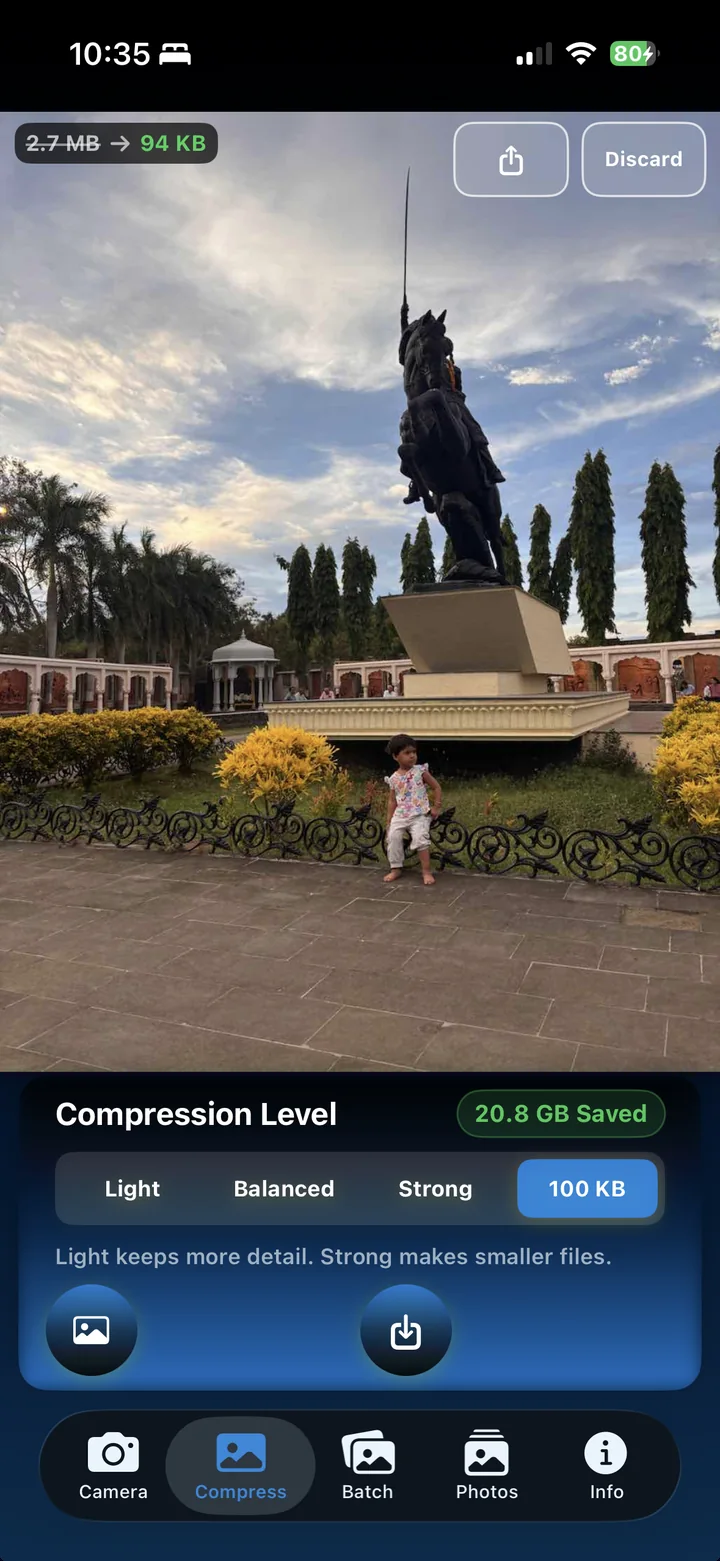
ZipCam photo compression showing the original and reduced size, compression presets, and a custom size target
Smaller files. Easier sharing.
Control over quality Photos ready for upload forms Less data to share

WHAT A SMALLER FILE MAKES POSSIBLE

Keep the moments.
Choose the file size.

Choose your settings, review the result, and save a smaller copy for sharing or upload forms.

Review before removing originals.

After saving eligible copies from Compress or Batch, compare them with the originals. Explicitly choose which originals to remove from Photos, with Apple’s confirmation.

Photo compression is free · Videos require Pro

Finish the form.

Choose a photo target from 1–1023 KB, including 50 KB or 100 KB. Batch custom targets work with selections of three photos or fewer. Check the output before submitting; results depend on the source and settings.

Custom targets for upload limits

See what changed.

Compress up to 99 photos per free batch. Batch and Folder summaries show file-size reduction and percentage savings. Open skipped or failed Batch items for explanations and next steps.

Photo batches: Free  ·  Video batches: Pro

Keep new photos lighter.

Capture and compress from one place. Each new photo can be ready to save or share as a smaller file, without switching between camera and compression apps.

Built-in camera + compression

Prepare your application photo.

Turn an existing photo into a passport-style image with crop and background controls. Check your authority’s requirements before submitting; acceptance is not guaranteed.

Passport-style photo preparation

Remember where it happened.

Keep the place and time with the picture. Add coordinates, date, time, and an optional map to give travel photos or site visits useful context.

GPS location stamps

Give each video a size target.

With Pro, set a maximum output size in MB for each video in Batch or Folder mode. Choose to preserve the original resolution, including 4K. Results depend on the source and settings; some targets cannot be met.

Pro · Folder/Infinity includes subfolders

Choose which metadata travels.

Preserve capture dates when available, and choose whether compressed copies retain location information. Location retention defaults to off for new settings; existing saved choices are respected.

Metadata controls for compressed copies

Drop files straight into your workflow.

Drag photos into Compress or Batch on iPhone, iPad, and Mac. With Pro, also drop videos and folders into Batch.

Photo drag and drop is free

Work comfortably on Mac.

Browse Batch thumbnail grids with adjacent previews. Use file and folder keyboard shortcuts and Finder actions, return to your last tab, and capture with improved Continuity Camera handling.

Designed for iPad · Apple silicon Mac

FROM TOO LARGE TO READY TO USE

Your photos, ready for what’s next.

SCROLL TO EXPLORE →
Screenshot device family

Real app captures in the device galleries. Figures shown are examples of output-file reduction, not space already reclaimed. Results vary with the source and settings. Mac uses the Designed for iPad app on Apple silicon.

PROCESSED ON YOUR DEVICE

Your media stays with you.

Media compression happens on your device without uploading media for processing. Optional Google Firebase Analytics is off by default for fresh installs; control it in onboarding or Info. Read the privacy policy for permissions and service details.

START WITH PHOTOS FOR FREE

Start with photos. Add Pro when needed.

Create smaller photo files for free. Choose Pro for video batches, folders, Cleanup selection, the saved-photo library, and Share Sheet compression on iPhone and iPad.

Free

Lighter everyday photos.

  • Photo presets for smaller files
  • Photo targets: 1–1023 KB (Batch: up to 3 photos)
  • Batches of up to 99 photos
  • Camera capture and compression
  • Passport-style photo preparation
  • GPS location stamps
Start with photos for free
ZipCam Pro

Lighter videos and folders, too.

Everything in Free, plus:

  • Smaller videos with Batch compression
  • Infinity Mode for folders and subfolders
  • Cleanup selection
  • Optional in-app saved-photo library
  • Share Sheet compression on iPhone and iPad

See current prices and purchase terms inside ZipCam. Pro is optional.

Explore Pro in the app

A FEW THINGS TO KNOW

Good questions.
Simple answers.

Does saving a smaller copy free up storage?

Saving a compressed copy adds a file; it does not remove the original. After saving eligible copies from Compress or Batch, compare them and optionally choose originals to remove from Photos, with Apple’s confirmation. Photos’ Recently Deleted behavior and iCloud syncing can delay available-space changes. Deletions can sync to other devices using iCloud Photos.

Can I compress photos and videos offline?

Yes, media available on your device can be compressed offline without uploading it for processing. Download iCloud-only originals first. Purchases, restoring Pro, and some location services need a connection.

What is included for free, and what needs Pro?

Free includes photo presets, 1–1023 KB photo targets, batches of up to 99 photos, camera capture, passport-style preparation, and GPS stamps. Batch custom targets are limited to selections of three photos or fewer. Pro adds Batch videos, Folder/Infinity compression, Cleanup selection, the optional in-app saved-photo library, and iPhone/iPad Share Sheet compression. See current prices and available purchase terms in the app.

Can I set a maximum video size and keep 4K?

Pro lets you set a maximum output size in MB for each video in Batch and Folder modes, with an option to preserve original resolution, including 4K sources. The source and selected settings determine the result; some targets cannot be achieved. Review the output size and quality before sharing.

Will copies keep the original date and location?

You can preserve capture dates when available and choose whether copies retain location metadata. Location retention defaults to off for new settings; existing saved preferences are respected. A visible GPS stamp is part of the image: turning off location metadata retention does not erase a stamp already in the picture.

Can I use ZipCam on Mac?

Yes, as a Designed for iPad app on Apple silicon Macs. Batch grids, adjacent previews, file and folder shortcuts, Finder actions, last-tab restoration, and improved Continuity Camera handling support desktop workflows. Share Sheet compression is for iPhone and iPad. Live Activity progress is available on supported iPhones.

Will compressed photos look exactly the same?

Compression can reduce detail. Use a lighter preset when detail matters, and compare the output before removing an original. File-size reductions depend on the source and settings.

Can I use a passport-style photo for official documents?

ZipCam provides crop and background preparation tools. Check the issuing authority’s requirements for dimensions, background, and file size. Government acceptance is not guaranteed.

Does ZipCam collect analytics?

Optional Google Firebase Analytics is off by default for fresh installs and can be controlled in onboarding or Info. Media is not uploaded for compression. Read the privacy policy for information about usage analytics and external services.

How do I get support?

Visit ZipCam Support for answers and contact details, or email zipcambybg@gmail.com.

ZIPCAM FOR IPHONE, IPAD & APPLE SILICON MAC

Smaller files.
Ready to share.

Choose the quality, review the result, and share a smaller copy.

Download on the App Store

Free to download · Optional Pro purchases

Here to help.

zipcambybg@gmail.com ↗
ALSO BY GANESH PAWARMeet SabjaApple Thermal State awareness